Showing posts with label Retrocomputing. Show all posts

Saturday, 4 August 2012

Final Dreamcastery nonsense at the end of Retrochallenge 2012

Retrochallenge 2012 has come to an end, so this is a catchup post of the mainly Dreamcast related foolery over the past week.

What every Dreamcast needs
Quite some time ago Kiyoshi IKEHARA designed a DCEXT board enabling connection of an IDE disk and an ISA (typically network) card to NetBSD/dreamcast, (I believe Izumi Tsutsui wrote the code). The patches never made it back into the main NetBSD tree and have just been maintained by Izumi.
 
Now someone is trying to add support for it to DreamShell, an alternative gaming OS for the Dreamcast, so I found a copy of the patches for netbsd-5, tweaked them for current, built a test kernel posted it to their forum.

Annoyingly the email notification of subsequent comments didn't seem to work for me, so I missed the very quick response asking for a kernel with additional debug. Just seen it now, so just built & uploaded it now :)

Elsewhere in my world of retro-challenge I still don't have public IPs for wopr (VAX) and orac (Dreamcast) after the office move, so wopr is very lonely on an internal network and orac is at home (where at least I can poke at it).

Unfortunately my "at home" Dreamcast CD-R burning opportunities are somewhat limited:
  • My thinkpad DVD drive is more than a little unwell. It writes CDs that not even it can read, and had a tendency to just randomly eject at any point during the day. Hence its been replaced by an sata drive bay
  • Michelle has a macbook air, which is beautiful, but optical-drive-less
  • My gaming PC has a blueray drive, and none of the CD-Rs it generates work with the DC. I have a whole stack of coasters that prove adjusting speed, burn options, or switching NetBSD/Windows has no effect
  • I have a Mac-mini which has a drive, but only OSX installed. (thinks). I *could* port dc-burn-netbsd to OSX, or at least the "burn existing ISO" option...
Anyway...

I had a play with telling NetBSD to add unused video ram to the normal kernel memory. Works perfectly on gxemul, but real hardware was a little pickier, so that it going to take some more work (if its possible).

Nick Hudson posted me a Dreamcast serial cable he was now longer using, which enabled me to find out that getty and remote are *really* fussy about using a read-only /dev, so I'm probably going to have to switch my live CD to use the standard tmpfs /dev trick. That is annoying to the tune of around 300K of wasted memory, but not the end of the world.

My current "goal of randomness" is to get the live CD to show a prompt in an xterm. Thats readonly-root-on-iso9660, with misc tmpfs & union mounts, running multi-user in 16M without swap, with the X server and one xterm running.

I've tested it on root-on-nfs without swap, so I think it should be doable... just. I wonder if I should add an option to dc-burn-netbsd to create a root filesystem suitable for testing over NFS - to avoid a fresh coaster per test (and the feeling that I can hear the Dreamcast CD seek mechanism expiring before my ears).

As if the VAX & Dreamcast retro-madness isn't enough I've just collected a PowerBook Duo 270c from someone who ran out of space. 12M RAM, 240M disk, 68030 & a 9" 640x480 screen. Its so *tiny* and cute that I actively want to do something useful with it, unfortunately its only I/O consists of two serial ports and a dock connector.

Did I mention I also picked up a Duo Dock II with it, which has a vast selection of ports, floppy drive, space for an addition disk, an FPU chip, additional VRAM, and two nubus slots. It addresses the "tiny, cute but no ports" aspect of the Duo 270c in a big way. However...

Do not make Dock angry. Dock crush!
  1. It is the size and weight of a small bus. I keep having to check underneath for wheels
  2. The network port does not appear to be fitted - so the *one* thing I need most, it doesn't do
  3. It requires the laptop to be closed and inserted - so I now need to find a an external ADB mouse, keyboard, and a mac compatible monitor (or adaptor)

Don't worry, its Apple approved
There is a beautiful scene from the film Brazil, where Robert De Nero - playing a renegade special forces equipped air conditioning engineer - pulls out a tiny component and says "thats your problem". When asked if he can fix it he says "no, but I can bypass it with *this*" and proceeds to take from his bag what can only be described as a cross between a cybernetic cthulhu and the spinal column of a robot made from valves.

I look at the tiny Duo 270c and the across at the docking station from hell, and think... "Thank you Robert, that will do just fine".

Monday, 16 July 2012

wargames meets Linux (and Dreamcast VGA)


When I wrote a small script to simulate the W.O.P.R. computer from wargames, little did I expect it to help me learn some new things about Linux (specifically Fedora in this case).

One criticism often cast towards people writing software on Linux is that they only write it for Linux, not caring about basic portability to other systems. Sometimes there has obviously been a pass to make it run on OS/X also, though earlier versions of XBMC were my go-to case for "portability" code which only cthulhu could love (So, if #ifdef _LINUX and #ifdef APPLE then... no, wait, what?)

Anyway, My Little Pony-I-mean-Wargames script was written on NetBSD, for my own use, but not intentionally using any NetBSD specific features.

Since I had the temerity to host it on github, of course someone is going to come along and try to build it on their $OS_of_choice, in this case Fedora.

So, lets count my portability fails
  1. I used "tput up" to move the cursor up, rather than "tput cuu1" (both work on NetBSD). To be fair "cuu1" does sound more like something a standards committee would define, probably short hand for "CursorUnproportionablyUpOneLineOnly"
  2. I used "{.TARGET}" and "${.ALLSRC}" in the Makefile. Gmake does not support these, which is interestingly as I thought the gmake project mission statement was to make bash look like a lean, minimally functional application. Still, easy enough to hardcode the values & we're portable
  3. I include a getopt(3) using program for outputting text called wopr, which at one point was called as 'wopr "IDENTIFICATION NOT RECOGNIZED BY SYSTEM" "--CONNECTION TERMINATED--" ""'. Traditional getopt() usage has option parsing stop when the first non '-' prefixed argument is reached. Linux is more... helpful... in this respect and happily picks up options from anywhere in the arguments... and quite possibly from the environment and your dotfiles. Wait... (check online), No, apparently I only *thought* I was kidding:
ENVIRONMENT VARIABLES
_<PID>_GNU_nonoption_argv_flags_
This variable was used by bash 2.0 to communicate to GNU libc which arguments are the results of wildcard expansion and so should not be considered as options. This behaviour was removed in bash version 2.01, but the support remains in GNU libc.
 So, now wargames now runs on Linux. Anyone with a Solaris/Illuminos machine want to take a pass? :)

(I'd like to thank the person on github who took the time to try wargames, and then fix it up to run on Fedora, and who should not take anything of the above as ingratitude :)

... meanwhile, on planet Dreamcast

In an earlier posting I may have commented on the quality of the construction of a newly acquired Dreamcast SD+VGA adaptor in a fashion which might have been construed as potentially disparaging. I am now delighted to revise that previous comment and to be able to state positively that indeed, it is a bit sh*t. By repeatedly pressing the plug into the back of the Dreamcast, and - god help me yes - by tilting to engage the assistance of gravity, I now have a clear and fully usable display. As before, walking heavily, sneezing, or careless placing of coffee cups near the machine is strictly prohibited.

I appear to be getting carried away in mentioning previous postings, in this case why gxemul was not able to mount the CD as a root filesystem while booted. I am lightly disappointed to say it does not appear to be some boneheaded mistake in my script as the CD image runs fine on real hardware, so if I want to use gxemul to test root-on-cd9660 Dreamcast image I'm going to have to poke into the gxemul source. Definitely still retrochallenge 2012 material, though only just :)

Sunday, 15 July 2012

Tidying up at the end of the week

Spot the server, printer, or cow
Spent some of today tidying up the house, and a little bit tidying up in the Dreamcast and VAX emulation world.
  • Updated the Booting NetBSD/vax in SIMH howto to reflect the changes in NetBSD-6, point to the correct page for the simh pkgsrc package and misc cleanup
  • Updated the NetBSD/dreamcast howto to point at the two very much easier methods of burning a Dreamcast CD
  • Relaxed the timer granularity check on the SIMH pkgsrc package to allow setting the idle check on machines with HZ=100 - now emulated vax machines do not need to max out the host CPU all the time
  • Fixed the configure mkstemp() check on the gxemul pkgsrc package, so it can boot full Dreamcast CD images again
  • Adjusted the dc-burn-netbsd script to include a full set of devices in the release-in-root-on-cd case, and attempted to test this in gxemul (hence the previous item)
Interestingly I discovered that once the CD image was booted in gxemul attempting to mount the CD failed with the (verbose) gxemul console messages:
[ GDROM cmd: 30 20 39 fd 9c 00 00 00 00 00 01 00 (cnt=2048) ]
[ diskimage__internal_access(): disk_id 0, offset 2791911424, transfer not completed. len=2048, len_done=0 ]
GDROM: diskimage_access failed? TODO 
Given the entire ISO image was 97,910,784 bytes in size, I suspect tying to access data at offset 2,791,911,424 is unlikely to yield a happy result in any universe with congruent natural laws to our own, but just to make sure I'll try to test on a real Dreamcast tomorrow.

Looks like I'll either be hacking my dc-burn-netbsd script to determine what boneheaded bug I've added, or gxemul's dev_dreamcast_gdrom.cc. Good good!

Saturday, 14 July 2012

Potential VAX gcc news (and damp dogs)

Today was not particularly productive in Retrochallenge terms - I visiting my parents and spent a large part of it digging fresh palisade roll into their garden, ably "assisted" by two dogs, one of whom tried to stand exactly wherever I needed to be, and the other just dug up random sections of flowerbed.


Fortunately it was raining continually, which should have driven the dogs indoors, rather less fortunately they were so caught up in helping me that they remained outside the entire time, finally following me back in trailing that distinctive fragrance of "damp dog"... and mud. Don't forget the mud.

I did manage to exchange email with someone who is both an expert on VAX assembler and gcc, who now has an simh NetBSD environment setup, and is investigating the possibility of fixing the latest gcc to be able to compile VAX executables which bear at least a passing resemblance to their source code.

This is definitely a Good Thing (in VAX terms), and would benefit anyone looking to compile VAX executables for any system using a recent gcc (Granted, this may be a rather exclusive club).

Oh, and I did fix a recently added reference in the NetBSD atf tree which unconditionally pointed to the gcc-4.5 stdc++, breaking the gcc-4.1 build (and I'm going to go out on a limb and guess the set of people who care about that make the group in the previous paragraph seem like a thundering herd).

Friday, 13 July 2012

Dreamcast display fail. Now with added SD-card!

When I first connected up my Dreamcast to boot NetBSD I used a generic RCA video to VGA convertor. It cames with its own little power adaptor and the sort of multi-button UI designed by monitor engineers from the late 90's who had clearly been through a messy divorce and wanted to share those feelings with the rest of the world.

The display was faithful to what you would see on a normal video monitor - so moderately awful - and faithfully reproduced the "we'll just hide the top or bottom two lines of your console to make typing a more challenging experience" effect. Starting X was particularly visually interesting, with the root weave pattern providing a crawling sensation on the insides of your eyeballs.


When I found out that Dreamcast SD card adaptors were easily available I immediately set out to buy one, but was then tempted by a combined VGA+SD, with its promise of crisper display, and the sensual delight of potentially being able to characters on screen as you typed them.

It arrived today, and was hooked up to the DC when I arrived in the office. Build quality was... adequate for something that had been assembled from parts left lying around in a workshop. In particular the two plugs appear to have been designed by someone who once spoke to someone who had the original plug described to them over a phone... in a foreign language. They fit, but much in the same way as breaking out all of the pins in a serial cable, then individually poking them into the serial port would fit. For a moment I seriously considered turning the Dreamcast onto its front edge to gain the assistance of gravity with keeping the plugs in, but in the end resolved just not to sneeze or walk heavily near it.

As for the display... the good news is that all of the lines from the console are visible on screen, the bad news is you need to take quite a relaxed view of the word "visible" . Think "ancient TV with something significant dying inside", with a side order of "who turned the brightness all the way down and broke off the knob".

Its a little disappointing to say the least. I will have another play on Monday then quite possibly email some pictures accompanied by a light sprinkling of sarcasm to the vendor...

Thursday, 12 July 2012

NetBSD/dreamcast from NetBSD in 4 minutes?

So last night I located an easy way to burn a NetBSD/dreamcast bootable CD from a Windows box, along the way discovering it was *almost* possible to use that mechanism to have the iso9660 filesystem used as the root fs.

It annoyed me that it was now quicker to burn a NetBSD/dreamcast CD on a Windows box than a *ix box, so tonight I decided to address that.

A fair number of years ago Marcus Comstedt write a number of very handy Dreamcast development tools, including a couple of utilities to generate a Dreamcast bootloader and then process a binary suitable for use with that bootloader ('makeip' and 'scramble' from http://mc.pp.se/dc/sw.html)

All I needed to do was wrap them in a little shell script, throw in a call to mkisofs to create an iso9660 CD filesystem and cdrecord to write and and I was done.

Then the creatures started feeping.
  • Obviously it would be convenient if the script could download the necessary kernel files from ftp.netbsd.org automatically, but you should also be able to point it at a locally built kernel
  • If downloading the version should be selectable
  • Selection of a plain GENERIC or GENERIC plus ramdisk be possible
  • As a final bonus it should be able to download a complete NetBSD distribution, extract and burn it onto the CD as the root filesystem
The end result was dc-burn-netbsd on github, and a sysutils/dc-tools pkgsrc entry which included dc-burn-netbsd, makeip, scramble, and a couple more dc tools.

... and finally the feeping stopped.

I can now say I've run a Dreamcast with an iso9660 (rockridge) root filesystem. Its not exactly fast, and you would really want to union mount some ramdisks over /var and suchlike to even consider trying to take it multiuser, but it works :)


% dc-burn-netbsd -h
Usage: dc-burn-netbsd [opts]
-C : Clean work directory before starting
-c opts : Set cdrecord opts (driveropts=burnfree gracetime=3)
-d : Take kernel/ & sets/ under datadir - no downloading
-h : This help
-k type : Set kernel type (GENERIC_MD) eg: GENERIC or GENERIC_MD
-n : Generate data but do not write (just display cdrecord commands)
-r : Include full NetBSD release on CD
-t tmpd : Set temporary work directory to tmpd
-v vers : Set NetBSD version (6.0_BETA2) eg: 5.1 6.0_BETA2

dc-burn will create a temporary work directory dc-burn-netbsd-files which will
need to have sufficient space to store the downloaded & generated files.

if -d is used the directory is expected to match the layout on ftp.netbsd.org:
- kernel/netbsd-$type.bin.gz, and
- sets/base.tgz (etc - if -r given)


Wednesday, 11 July 2012

NetBSD/dreamcast from Windows in 5 minutes

Thanks to http://www.flickr.com/photos/russellede/ for this image
Retrochallenge segue: How to burn a Dreamcast boot CD from Windows?

Someone was asking on the NetBSD/dreamcast list about burning a bootable CD from a Windows machine. Its already easy to burn a CD using a NetBSD 'cdburn' live image, but obviously in this case they prefer to burn from an existing Windows machine.

It certainly is possible - and turned out to be quite easy:
  • Download BootDreams
  • Create a new directory
  • Download a NetBSD/dreamcast .bin kernel (*), uncompress,  and rename to netbsd.bin (to ensure it is no longer than 12 characters + .bin), and put into above directory
  • Run BootDreams
  • Insert blank CD-R (Not CD-RW)
  • Select "CDRecord" (4th icon)
  • Click "Browse" and select the above directory
  • Click "Process" and answer "Yes" to any questions

(*) NetBSD/dreamcast kernels are available in two forms, as netbsd-GENERIC.bin.gz which is just the kernel and netbsd-GENERIC_MD.bin.gz  which includes a ramdisk with basic shell tools. Remember to gunzip the file to get the .bin. (a tool like 7zip should handle that).

A GENERIC_MD kernel will boot up directly to a shell, while a GENERIC kernel will prompt for the root filesystem - which will be rtk0 if you have a BBA and NFS serving machine, and gdrom0a for root-on-cd.

The latest released kernel is in
The BETA2 test kernel for the upcoming NetBSD-6 release is in:
There are also nightly builds of -current and the various netbsd- branches at

As a bonus any files in the same directory as the kernel are accessible to the booted NetBSD image, offering some interesting possibilities of "root on CD". Extracting base.tgz into *almost* works - it just fails when init tries to run /dev/MAKEDEV as due to the case-insensitivity of Windows it is now /dev/makedev, plus any symlinks have been mangled.

I would hope a RockRidge format CD written on NetBSD would Just Work... Something to try tomorrow!

Tuesday, 10 July 2012

eMSCPation proclamation

Diagram from MSCP patent
Tonight's Retrochallenge 2012 diversion features some MSCP code I wrote a couple of weeks ago, but have only just committed to the NetBSD source tree.

MSCP, or Mass Storage Control Protocol was designed by Digital Equipment Corporation to provide high level but low overhead communication with storage devices.

It was used extensively on PDP-11 and early VAX, and even some DEC MIPS system. Later systems tended to drift across to the then available SCSI.

At some point before the netbsd-6 branch the MSCP driver started behaving oddly (cleanups related to kernel threads). Under the quite excellent simh-vax emulator it would report (and ignore) an additional phantom device on the bus, but on at least some real hardware it would end up in a decidedly unhappy state, with the machine unable to access any devices.

Not actually having any real MSCP hardware made this a little harder to debug, but thanks to the delightfully interconnected world in which we live someone was willing to test build kernels based on diffs from me to track down the issue and confirm the fix.

The issue turned out to be an interesting interaction between the mscp_attach() routine, which iterated through the units on the bus, sending an M_OP_GETUNITST+M_GUM_NEXTUNIT message to each, and mscp_dorsp() which processed interrupts (and returned messages) from the devices. When probing for devices M_GUM_NEXTUNIT provides a very handy ability to find the next active unit - so if you have unit ids 0 and 8 you can probe for 0 with M_GUM_NEXTUNIT and get 0 back, then probe for 1 with M_GUM_NEXTUNIT and get 8 back, without all that tedious mucking about in hyperspace, - ahem, or rather without having to probe the intermediate unit ids. Once you try probing past the last unit, it loops around. The mishandling of this final probe was what gave the phantom device and much unhappiness.

So, some simple changes, a tweak to better handle non-contiguous unit ids, and an opportunity to replace a couple of gotos with a for(;;) loop, and NetBSD/vax is happy again.

The next phase is to clean up the MSCP code further to permit attaching new devices while the system is running. Ragge (the vax portmaster) is going to play with that one, but it seemed best to get my changes in the tree so NetBSD-6.0 will be guaranteed to have working MSCP code :)

In other news since it was updated to NetBSD 6-BETA2 the Dreamcast has finished building bash & zsh and has *nearly* finished building simh. Why would I want to build a vax emulator on a Dreamcast which uses a VAX as an NFS server? Surely there could not be some strange and twisted plan afoot? We shall just have to see...

Monday, 9 July 2012

Whats new Dream Cat? (wooah-wooah)

Arrived into the office this morning, rebooted the Dreamcast and started it building zsh and bash (bash is still compiling as I type). Rather than actually accomplish anything Retrochallenge related today I spent a little time browsing the InterTubes and wondering if there was anything obvious NetBSD could do better to take advantage of the Dreamcast.

Found a very interesting Russian site discussing Dreamshell - a
homebrew OS for the Dreamcast.

They have some very nice hardware pages, including schematics for:


Obviously the SD serial adaptor is going to be slower than directly
attached hardware, but people are reporting 650KBytes/sec write speed
(out of a theoretical 1.5Mbytes/sec, which isn't bad for a $20 shipped
to your door adaptor). Oh, and have ordered one :)

Also, while the Dreamcast is typically quoted as having 16MB of  RAM, it also has 2MB of "audio RAM" (attached to the ARM sound controller), and another 8MB of video RAM. If you're running a 3D game on the Dreamcast this division of memory may make a lot of sense, but when running a general purpose OS much of that 10MB could be put to better use. Even if its too slow (or simply unavailable) to run programs in directly (more research needed), it should at least be possible to make it available for swap space or even a ram disk.

So, I think there is real scope for some NetBSD/dreamcast related kernel hacking during the rest of RetroChallenge 2012. It will make a change from just plugging together existing stuff in unusual ways, or writing vintage fantasy computer simulators.

Sunday, 8 July 2012

Dreamcast virtual display - 50% off!

gxemul -XEdreamcast booting NetBSD-3.1.1
Not having a great deal of time to spare this evening for Retrochallenge 2012, and having neither the Dreamcast or the VAX to hand, I decided to have a quick run of the gxemul Dreamcast emulator to see how easy it was to use as a test environment.

It turned out to be amazingly easy to run - just install gxemul, download a NetBSD kernel and run gxemul -XEdreamcast kernel.gz.

Interesting display though - the entire bottom part of the display appears to be blank for NetBSD-{6,5,4} and intermittently for NetBSD-3.1.1.

The fact that booting a NetBSD 3.1.1 kernel *sometimes* displays correctly is quite curious - fortunately gxemul outputs various debug output:

Bad boot:
[ pvr: DIWMODE set to: clock_double=0, ...
[ pvr: SYNCCONF set to: video_enabled=1, NTSC, interlaced=1, ...
...
[ pvr_geometry_updated: 640 x 240, RGB565 (16-bit) ]

Good boot:
[ pvr: DIWMODE set to: clock_double=1, ...
[ pvr: SYNCCONF set to: video_enabled=1, VGA, interlaced = 0, ...
...
[ pvr_geometry_updated: 640 x 480, RGB565 (16-bit) ]

So... a happy boot thinks its setting up a VGA output and an unhappy one has picked the American "Never Twice Same Colour" TV standard. Could be an uninitialised (virtual) register?

Completely irrelevant to what I was intending to look at, but I definitely think I'll be having a poke around with this further, just not tonight :)


Saturday, 7 July 2012

Wargames for the masses

Yesterday for Retrochallenge 2012 I wrote a little shell script to simulate the interaction with the WOPR computer in wargames. (Connect link)

It was quite incomplete, and bodged into the telnet port on the VAXstation, so tonight I polished it a little, and then a little more, adjusted the output timings, made it very generous when accepting input (so you could type "fine", rather than "I'm fine. How are you"), and finally made it go back and rewrite what the user typed in such cases to match the film.

Finally I got over-enthusiastic and put it up on github and added an entry to pkgsrc.

Notice, at no point in this process did I ask myself "why?".

Along the way I found out how easy it was to setup telnetd to automatically run a program instead of asking for login, and found a java telnet app to add to wopr's home page to make it easier for random web users to connect to the script. I also tweaked the font colour and style to better match that in the film.

Its this attention to pointless detail that is probably quite worrying.

Its like building a perfect matchstick model of a chair with a broken leg, who's only purpose is to be put on a bonfire.

Learning how to setup telnetd to autorun a program instead of login would be potentially useful... if it was 1992 and anyone still had any use for telnet.
(for reference just set the telnetd arguments in inetd.conf to "-g foo -a off -h" and in gettytab copy default to foo and replace the im= with lo=/path/to/app).

Still, after dropping into an email thread on the simh list I've submitted a request to pullup a commit from Matt Thomas' so simh will be able to detect when a NetBSD-6 vax guest is idle and save CPU cycles.

So... looked at it from the right perspective, that will reduce energy use and carbon emissions, so in a tiny way I just may have done something today which will help save the planet! ... or mabye not.


Friday, 6 July 2012

The only winning move is...

Taking a break from a playing directly with retro-hardware, last night I watched wargames and took a few notes on the interaction with the WOPR computer.

The result, lovingly crafted into a simple shell script was connected up to the telnet port in inetd whereupon three issues immediately sprung up
  1. Since there is no local telnetd, the script gets to see the initial IAC command codes (called for a little sed hackery)
  2. Calling 'system("sleep 0.1") from awk on an amd64 box sleeps for about 1/10 of a second. On a VAX... its more like 1/5 a second with overhead. Cue writing a small C program to handle outputting the text
  3. I'm pretty sure TCP Nagle is kicking in and making the output blocky, but its late & I'll come back to that
Anyway - the result should be visible by "telnet wopr.absd.org" (If your client tries SRA login you may need "telnet -K wopr.absd.org"). It turns out there was quite a lot of interaction with WOPR in the film. I suspect I have about 60-75% of it complete (mainly towards the start), and I've tried to be relatively generous in what it accepts (checking for a matching key word rather than an entire sentence).

So, how much do you remember from Lightman's typed conversations with WOPR? telnet to wopr.absd.org and test your memory :)

(In other news I upgraded the Dreamcast to NetBSD-6, which went fine apart from the fact I'd forgotten the kernel had been set to prompt for a root device, which meant my decision to run a final reboot *after* leaving the office was... unhelpful)

Thursday, 5 July 2012

Retrochallenge mission accomplished. Need new mission!

So this morning's Retrochallenge 2012 activity was reuniting the Dreamcast with the VAX and setting the VAX up to act as a dhcp and NFS server to the DC (copying the config from home).

Sundry small sysadmin tasks later (adding swap, users, mounting /home from the vax, installing some binary packages and starting a build for the latest PHP (don't ask)), and there was just time to break for the pre-9am coffee.

So, what do we have:
  • wopr - an 128M VAXstation 4000/90A acting as a NFS server to
  • orac - a 16M SEGA Dreamcast with sh3 CPU
Both have user logins and run web servers (wopr with PHP). orac has also run X (640x480 with a composite video to VGA adaptor is not a pretty sight).

Both have a 'falken' login which runs the standard NetBSD /usr/games/wargames script (the password *is* the obvious one :)

So, what next for Retrochallenge 2012:

Some thoughts:
  • The wargames script really could do with being a little more faithful to the movie. Per character delay, more interaction, prompting for Global Thermonuclear War or even a nice game of chess :)
  • Turning this into the worlds strangest honeypot. I have a sparc classic with two network interfaces which could act as a monitor, but what apps and accounts should be on the target VAX & Dreamcast machines? Samba? some hugely vulnerable web apps?
  • Running an sh3 emulator on the VAX & a VAX emulator on the Dreamcast?
  • Adding as many alternate architectures to the cluster as possible. Partial marks only for using VPN connections to alternate locations
Or... something else?

Your suggestions wanted!

Wednesday, 4 July 2012

Dream a little cast of me...

A little time poking at NetBSD on the Dreamcast at the end of this evening.

Things I have learned.
  • If your Dreamcast clock battery has failed, there is no way to get past the poweron "set date & time" screen without a controller. Having a bootable CD, ethernet BBA and full keyboard is no help. Strictly speaking I learned this yesterday when I brought everything *except* a controller home. The Dreamcast and I did not end that night on speaking terms
  • The console display is 80x30 - the top two lines of which are invisible on the UK Dreamcast (with two blank lines at the base), the bottom two invisible on the Japanese Dreamcast (with no space at the top). Isn't choice wonderful?
  • The Dreamcast Japanese keyboard is tiny, cute, and full of many bonus glyphs you find when hoping for an underscore. Particularly good to know when you're typing "mount_cd9660" on a Japanese Dreamcast with the bottom two invisible lines
  • Dismembering the Dreamcasts to swap power supply boards gets old very quickly
  • The sonic characteristics of the fans in the two Dreamcasts are quite different, but both of them rapidly achieve Michael-Bolton-with-fingernails-on-blackboard-backing-sounds levels of annoyance
  • Audioplay *mostly* works, at least for the first four seconds of any wav file, and then for  some indeterminate sections of the rest. Perfect for playing songs to those with exceptionally short attention span
  • The gdrom0 device will not recognise disklabels, but will mount standard iso9660 CDs (including the special boot CD), so there may be scope for an easy root-on-CD image
  • Yes, that is a picture of a less than happy cow (thankyou John)

Tuesday, 3 July 2012

I'll give you my dmesg when you take it from my cold, dead hands

Tonight's (rather quick) NetBSD/vax retrochallenge change was to disable kernfs from the install kernel & include dmesg in the crunchgen binary.

The installer images for most NetBSD ports already do this, and there is something quite offputting in any *BSD system, no matter how cut down in seeing "dmesg: not found"

Net effect is a slightly smaller image, and of course the ability to drop to a shell at any point and type dmesg... just like $deity intended.

As an added bonus I took the opportunity to add dhcpcd to the vax installer image, because frankly life is too short to be manually entering IP addresses...

The more eagle eyed among you will notice the dmesg image above is both a xterm screengrab, and obviously from a simh-vax emulator. This is because tonight I am far from my vax, and the edit-build-test cycle is a lot more convenient run locally on my Thinkpad.

Fear not, these changes will be run on real iron too...

Monday, 2 July 2012

NetBSD/vax moves to MAXPARTITIONS 16

Image courtesy of Computer History Museum
This is RetroChallenge 2012 month, and as my Dreamcast and VAXstation are still many miles apart I decided to finish off switching NetBSD/vax from 8 to 16 partitions per disk.

Turned out to be quite simple to do - once I remembered to check that the boot blocks would need to be adjusted to handle the larger disklabel.

Of course given the average disk size in use on a VAX is likely to be on the order of dozens to hundreds of MB there may not necessarily be as many obvious uses for more partitions, but to quote a *nix saying "Here is rope. Do stuff".

Copy of the message sent to port-vax to inform users of the change:

For all you staring at that RD52 and wondering how to make full use of
its capacity with only seven partitions, your solution is here!
No more will you have to nest devices to allow you to create 15
separate 2MB partitions, now NetBSD/vax has been extended from 8
partitions per device to 16! (*)

(*) Also works for devices greater than 31MB!


After updating current all existing /dev nodes should be unaffected,

just run MAKEDEV to gain access to the additional partitions.

Commit message:

- Increase MAXPARTITIONS for vax from 8 to 16, using the standard NetBSD
  mechanism to ensure all existing /dev nodes continue to work
- Adjust boot block layout to fit additional partitions
- Adjust number of inodes on install media

Sunday, 1 July 2012

Retrochallenge 2012 - public access Dreamcast?

So, just noticed RetroChallenge 2012, which has various rules including:
  • [...] computer systems must by approximately 10 years old (or older!) [...]
  • Gaming consoles and PDAs qualify if they were made in the previous century
Well, the opportunity to comply with both of the above rules in one task is too good to miss, so onwards with my plan to setup a Sega Dreamcast as a public access *nix server, using a DEC VAXstation 4000/90A as a netboot and file server.

For this plan to success all I needed was:
  1. A VAXstation 4000/90A, suitable for running dhcpd & nfs - that would be wopr
  2. SEGA Dreamcast, with BroadBand Adaptor (ethernet) & keyboard
  3. Cables, spare IP, downloaded NetBSD etc
  4. Time and for everything to work
The plan suffered an early setback when the Dreamcast I acquired turned out to have a Japanese 110V power board which steadfastly refused to work with any 110V power supply I used.

Fortunately the Bay-of-e has a ready supply of UK Dreamcasts with functional 240V power boards, quite cheap - particularly if you are willing to include a cosmetic condition of "Appears to have been used regularly as some form of dinner receptacle, also possibly slightly chewed by dog"

A few moments with a screwdriver and my UK powered Japanese Dreamcast powers up with a NetBSD-5.1 CD in the drive.

The first thing I notice is its loud. I think louder than the VAXstation (as the VS is around 5.5miles away its difficult to tell for sure, but last time I checked it didn't have a 2cm fan making a valiant attempt to bore its way out through the case).

The second thing... the bottom two lines of the console are invisible. This provided a sufficiently convincing representation of "bizarrely hung" for my initial joy at the dmesg to pass through a selection of profanity before I worked out what was happening.

Not having the VAX to hand (that would be some mighty big hand), I decide to use my trusty HP microserver as a dhcp and nfs server and a few minutes later...


Hmm, this could be too easy... maybe once the Dreamcast is up I can try building simh on it and set it up to emulate a VAX?

Incidently, if anyone would like a login to the VAX (now) or the Dreamcast (soon)... let me know :)

Monday, 4 June 2012

Retrocomputing with a VAMP stack: VAX, Apache, MySQL & PHP

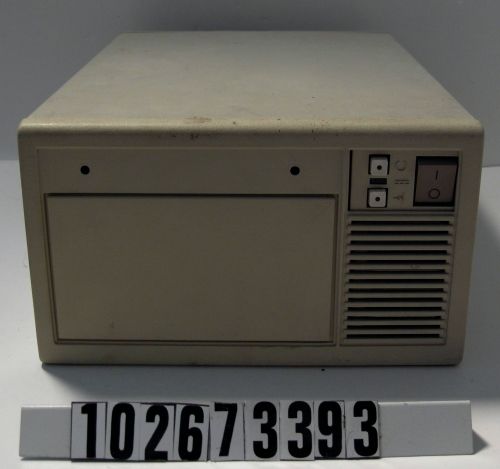
"wopr". A VAXstation 4000/90A
What to do with a VAX workstation, based on an architecture first released by Digital Equipment Corporation in 1977 and finally closed out by Compaq at the end of the last millennium?

The obvious option would be to dig out an ancient copy of VMS, or maybe an early UNIX tape, but what then? Could it run the latest Apache or screen, and how will I be able to connect it to a native IPv6 network (when we finally get there :) ?

As an alternative, lets see if a current OS and software can run on a machine with an architecture older than some of the *parents* of modern developers...

In an ideal world, with a warehouse, a personal power station, and an unlimited time budget I'd find an original VAX 11/780. Working in the real world I compromised with a VAXstation 4000/90A, which is around PC sized with PC power consumption (if not performance :)

"wopr" has a 72Mhz CPU and is packed out with 128MB of 58.5MB/sec memory (no laughing in the back there), complete with colour graphics and an 8GB SCSI drive, and probably would have cost close to £20,000 in 1992.

Now in VAX terms this is a blistering fast machine, with a raw CPU performance of 40 VUPs (40 times the speed of the original 11/780).

Now you could regard using such a "fast" VAX as cheating, I regard it as choosing to be able to write this blog entry this year, rather than in 2018...


Installing the OS


For the OS I chose NetBSD (for reasons blindingly obvious for anyone who knows me and pretty much irrelevant to the rest of the world).

At this point you can assume a montage soundtrack in the background and lots of split screen visual effects covering: downloading the latest NetBSD/vax 6-BETA, setting up my laptop to run mopd (DEC proprietary MOP boot protocol), dhcpd (for the boot loader to query for IP address & kernel), tftpd (for the kernel), and nfsd (for the filesystem).

The montage music fades as we're left with a screen saying

NetBSD/vax (wopr) (ttyE0)

login:

Actually this happened concurrently with a magical side quest involving trying to wire a serial console cable with:
  1. An RJ14 cable which needed to be cut to fit into the VAX MMJ console (and then kept falling out)
  2. An RJ25 to DB9 shell (sold as an RJ14 to DB9)... of the wrong gender
  3. A DB25 gender changer 
  4. A DB9 to DB25 adaptor
... to allow me to try poking the loose pins of the DB9 shell into the DB25.
This was combined with several VAX console guides on the Internet which could not agree on the numbering of the required pins, and a certain amount of profanity.

Additional entertainment was provided by the GNU compiler (gcc), which in its 4.5.3 incarnation doesn't so much compile for the VAX as throw together sequences of VAX code in the vague hope that by the time they are executed the machine has fallen into a parallel universe where they now make sense.

NetBSD/vax has now switched back to gcc-4.1.3, which implements a more conventional level of mis-optimisation issues and (very) occasional compiler crashes.


Selecting and installing the software


Most things seemed to compile "out of the (pkgsrc) box". I should point out that I'd been chatting to a couple of people interested in running apps on the box, hence the somewhat eclectic selection of packages. At least two of them ran Debian x86 boxes their end, which explains (at least in my mind) the X apps. Some of them actually use it as a persistent IRC client, running weechat or nirc in a screen session.

The final result (to date) is http://wopr.absd.org/. Conclusive proof that you can (more or less) run the latest software on retrocomputing systems.

For anyone still reading, benzodiazepines are available on prescription, and if you're *still* reading, here are some of the issues encountered :)
  • PHP has a php_get_inf() call which returns INF (infinity)... only on VAX there is no infinity (existential concepts aside - VAX floatingpoint maths has no concept of infinity, so the PHP code tried to return 1/0, which on the VAX is a quick route to a floating point exception and a core dump). A quick patch to special case __vax__ and we're good
  • cmake has an... interesting way to determine whether the current system is big or little endian. Rather than trust the system's include files, which after all are only part of the operating system and could have no idea of the processor type, cmake chooses to have a huge long special cased list of  processor defines. So __vax__ fits nicely after other notable obsolete processor such as _s390__ (IBM ESA/390) and __ia64__ (Intel Itanium)
  • naim has a clever if somewhat cryptic assert() to check that its being used against ncurses rather than ncursesw. Since NetBSD ships with its own curses implementation the assert was tuned to be less aggressive. Amusingly enough this issue was also present on NetBSD/amd64, so in this case playing with retrocomputing hardware has had potentially tangible benefits for people on modern machines - you have been warned!
  • xneko failed on startup, which turned out to be a bug in the "non kernel implementation of the optional polyd VAX instruction as used in the assembler libm sin() implementation", now fixed. 'nuff said
  • xkobo aborted with an XFont issue on startup if the remote display was Debian. This was tracked down to selecting a font which was in the standard X11R7 distribution, but not installed as standard on Debian. It now catches missing fonts and falls back to "fixed". This has the potential to benefit any pkgsrc using Debian user worldwide... who try to run xkobo. I'm pretty sure that intersection is a null set, but... no, its a null set
  • MySQL failed to build because it depended on bash... which depended on bison... which when pkgsrc tried to check for portability issues caused awk to choke on parsing the test scripts. Apparently the strtod() implementation doesn't *quite* grok VAX FP limits, causing a free SIGFPE exception with every overlarge number. Skipping the check allows MySQL to build, but MySQL 5.5.24 seems to fall over on startup after creating the databases. 5.5.25 may fix this, but as it only started to compile 22 hours ago, we're still waiting to see if it does :)
  • python, irssi via glib2 and a selection of other software depends on libffi, for which there is no VAX implementation. This looks to be non trivial to fix and require a significant amount of VAX compiler-fu.

Conclusion


So there you have it, retrocomputing with Apache-2.4.2, PHP 5.3.13, Perl 5.14.2, Bash 4.2, and Screen 4.0.3. Its almost civilised...

My next task is to submit back some of the VAX patches to the various projects (rather than just leaving them in pkgsrc), to see exactly what kind of response I get.

Tune in next [some arbitrary time interval], when I hope to get X running on the VAX, try to build Mosaic, and use the VAX as a network server for a SEGA Dreamcast...